The Targeting Playbook

Why Sales Navigator filters hand you a clean looking list of the wrong people, and the boolean search that fixes it.
ps - if you would rather we build the list with you, book 20 minutes with the team. We will build one live against your real buyer on the call.
Not using Reachium yet? Sign up here.
Across our accounts these lists have run at 36.5 percent acceptance over 34,056 requests.
Steal this first
Take the job title you have been filtering on. Put it in the LinkedIn search bar like this instead.
("head of revenue" OR "revenue operations" OR "VP revenue") AND ("SDR" OR "outbound")You are no longer asking LinkedIn who holds a title. You are asking who wrote those words about themselves.
Run that against your current filtered list and compare the two. The overlap is usually under half, and the difference is the point of this document.
Why the filters are unreliable
Every Sales Navigator filter sits on top of data that people typed about themselves, or that LinkedIn guessed. Neither is verified.
Job title is a free text box. Head of Growth is forty people at one company and a solo consultant at the next. Founder covers a 200 person company and somebody who registered a business last month. VP of Sales sometimes means a VP of Sales and sometimes means a senior rep whose company hands out titles instead of raises.
Company headcount comes from the company page. It is whatever somebody last typed there, which for most small companies was years ago. It also counts everyone with the company listed on their profile, including contractors, alumni who never updated, and the founder's second entity.
Seniority and Function are not fields at all. Nobody fills those in. LinkedIn infers them from the words in the title string, which means you are filtering on a guess about a self reported field.
Years in role and years of experience are calculated from dates people entered by hand and rarely correct.
So the list comes back looking immaculate. Clean rows, plausible titles, right company sizes. And a large share of it is people who do not match, which you find out three weeks later, after you have blamed the copy and rewritten the sequence twice.
There is a second problem underneath the first. Search caps out. Basic LinkedIn search stops at 1,000 results and Sales Navigator stops at 2,500. Everybody in your category is filtering the same way and exporting the same shallow slice.
The dropdown tells you what somebody claims. The keyword tells you what they do.
Moving one list from filtered to searched took our own booked calls from 18 to 86 in 30 days. Same message. Same daily cap. Different people.
The boolean build that replaces the dropdowns
Boolean search reads the words people actually wrote: the headline, the about section, and the description on their current role. Those are the places a buyer describes their own problem in their own language.
Somebody genuinely doing the job says so out loud somewhere on their profile. Somebody who inherited the title does not.
The four operators, and that is all of them
Quotes make a phrase exact. "head of revenue" matches the phrase. Without quotes you get every profile containing head and revenue anywhere.
OR catches the variants of the same thing. Buyers do not use one word for their own role.
AND narrows to profiles carrying both ideas.
NOT strips out the contamination. This is the operator people skip and it does more work than any other.
Parentheses group them. Capitalise the operators, LinkedIn wants them in caps.
The shape that works
Every good string has three parts: who they are, what they do, and who they are not.
(role variants) AND (problem or activity words) NOT (contamination)That is it. Now the worked examples.
Worked example 1: sales leaders who own outbound
Bad, the filter version: Title = VP of Sales, Company size = 51 to 200. Returns heads of enterprise sales at companies with no outbound at all, plus three people whose company calls every AE a VP.
Good, the boolean version:
("VP of Sales" OR "VP Sales" OR "Head of Sales" OR "Sales Director" OR "CRO")
AND ("outbound" OR "SDR" OR "pipeline generation" OR "prospecting")
NOT ("recruiter" OR "talent" OR "coach" OR "consultant" OR "fractional")
The middle clause is doing the real work. It finds the people who describe outbound as part of their job, rather than everyone who holds a sales title.
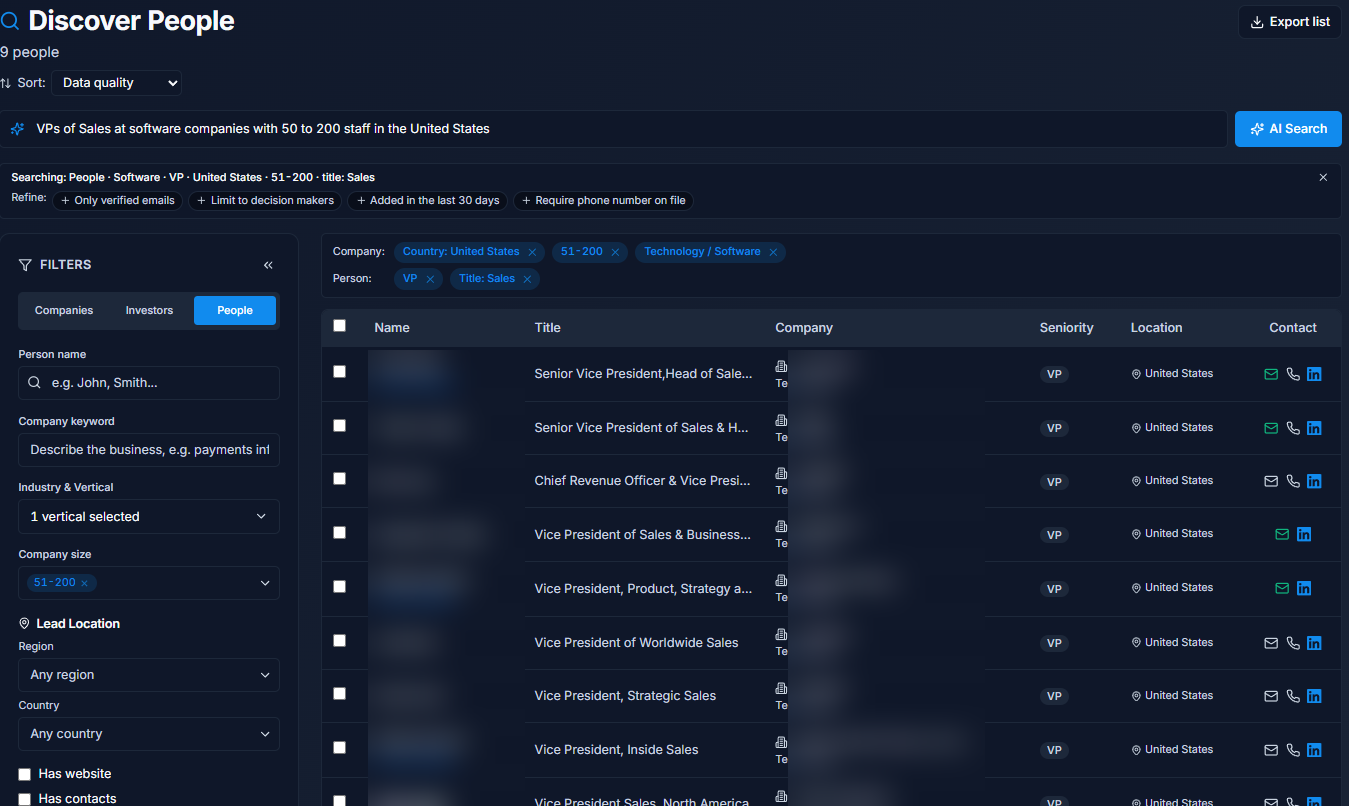
One sentence became the filters. Check the sample before you build 300. Names hidden.
Worked example 2: founders at the stage where they still do sales
("founder" OR "co-founder" OR "CEO")
AND ("B2B SaaS" OR "software" OR "SaaS")
NOT ("advisor" OR "investor" OR "angel" OR "mentor" OR "portfolio" OR "ex-")
The NOT clause here is essential. Search founder on its own and half the results are people who founded something in 2011 and now write about it.
Worked example 3: agencies running outreach for clients
("agency owner" OR "founder" OR "managing director")
AND ("lead generation" OR "demand generation" OR "appointment setting" OR "outbound agency")
NOT ("looking for work" OR "open to work" OR "freelance writer")
The words to search on
Search the words your buyer uses about their own problem, not the words you use about your solution.
Nobody writes "revenue operations optimisation" on their profile. They write "we book meetings". Take the three sentences a customer said on your last call, pull the nouns out of them, and search those.
Two lists to build before you write a string:
Role variants. Every title the same human might use. Ask two customers what they call their own job and you will get two answers.
Contamination words. Everything that keeps showing up that you do not want. Recruiter, coach, fractional, open to work, student, ex-. Build this list by looking at your last bad list and writing down what annoyed you.
Here is the prompt that does the drafting.
I sell [what you sell] to [who you sell to].

Build me three LinkedIn boolean search strings for that buyer.

Rules:
- Use quotes for exact phrases, capital AND / OR / NOT, parentheses to group
- Clause 1: every title variant this person might actually use
- Clause 2: the words THEY would write about their own problem, not my product words
- Clause 3: NOT, to strip recruiters, coaches, fractional, students, and anyone
  selling what I sell

Then tell me, for each string, what kind of wrong person it will still let through.
That last line is the one worth keeping. Every string leaks something, and knowing what it leaks is how you write the next one.
Qualify on behaviour, not attributes
A string gets you the right kind of person. Behaviour gets you the right moment.
Attributes are self reported. Events are not. Nobody can misreport having posted last Tuesday.
Three qualifiers that cannot be faked:
Posted in the last 30 days. They are actually on the platform. A dormant profile does not reply and drags your acceptance rate down.
Changed jobs in the last 90 days. New in role, still choosing tools, budget not yet spent, and actively looking for ways to look competent quickly.
Hiring for the role you replace. The strongest signal there is. A job posting is a company saying out loud that they have this problem and are willing to spend money on it.
Layer one of those on top of a good string and you have a list worth writing for.
The four filter list audit
Before you write a single message, score the list out of 4.
Narrow. One buyer, one size band, one country. If you cannot say it in a sentence out loud, it is not narrow.
Active. Everyone has done something on LinkedIn in the last 30 days.
Triggered. Something happened recently to at least a good share of them.
Clean. No students, recruiters, competitors, or people you already have an open thread with.
Scored 4? Write the messages.
Scored 2 or 3? Fix the list. It is a shorter job than rewriting the sequence and it pays more.
Scored 0 or 1? Do not send. You are about to spend a month of daily limits proving to yourself that outreach does not work.
The brand profile you set once
Everything downstream sounds generic if nothing upstream knows who you are. Set this once and every list, message and reply is written against it instead of against nothing.
Set up my brand profile.

Company: [name], [what it does in one sentence]
Who we sell to: [the three buyer types, and what each one is worried about]
Proof we can actually show: [numbers you can screenshot, and where they came from]
Claims we never make: [anything you cannot back]
Links: [booking link, trial link]
Voice: [paste three things you have actually written]
The "claims we never make" line is the one that saves you. It is what stops an invented number ending up in a message with your name on it.
The three step sequence
Under 300 characters each. No pitch until step three.
Step 1, the connection note. One true sentence about them, one sentence on why that made you reach out, one question they can answer in a sentence.
[First name], [one true thing from their profile or last post].

[Why that made me reach out, one sentence].

[One question they can answer in a sentence]?
Step 2, three days later if no reply. Shorter than the first one. No new information, no pitch.
[First name], still worth a conversation on [the thing from message 1]?Step 3, and only now. One specific offer that fits what they told you, or the free resource if they told you nothing.
No problem if the timing is off. I wrote up how we [the specific outcome]
for [buyer type] if it is useful: [link]

Happy to leave it there either way.
Notice the escape hatch in step three. Making it easy to say no is why people say yes.
Launching at 25 a day, and the A/B test
25 connection requests a day, per account, spread through the day. Not 175 on Monday. The cap exists because the account is the asset, and a restricted account costs more than a slow month.
Do not judge copy before 200 sends. Under that you are reading noise. Two variants, same list, same daily rate, and let the test name the winner rather than picking the one you liked writing.
Change one thing at a time. If you change the list and the message together, you learn nothing.
Here is the launch prompt.
Launch this campaign at 25 requests a day, spread through the day.

Run an A/B test on the connection note only. Variant A is the current one.
Variant B changes only line one.

Report back at 200 sends with acceptance and reply rate for each, and tell me
which one won and whether the gap is big enough to matter.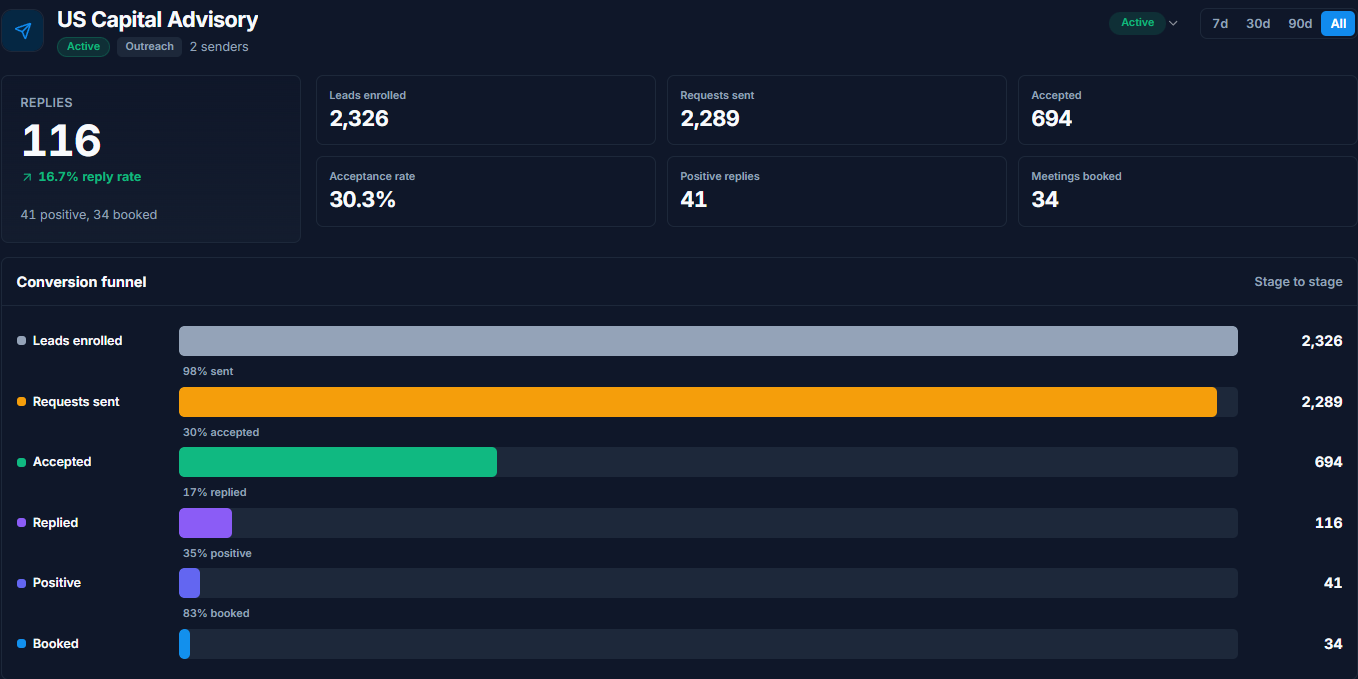
One campaign at 25 a day, all time: 2,289 requests, 30.3 percent accepted, 116 replies, 34 meetings booked.
Your first 48 hours
Write down the three sentences your last good customer actually said
Pull the role variants out of them
Build your contamination list from your last bad list
Write one boolean string using all three clauses
Run it and compare the first 50 against your filtered list
Layer on one behavioural qualifier
Score the result against the four filters
Set the send rate to 25 a day
What we promise
You approve everything. No list gets messaged that you have not looked at.
The cap holds. 25 a day, per account. We do not push it.
It runs on the official API. Nothing clicks around your browser at 2am, which is why the account does not get restricted.
No borrowed numbers. The 36.5 percent acceptance across 34,056 requests at the top is ours, on our lists. It is a shape to aim at, not a promise about yours.
If you would rather not do this yourself
The strings above work whether or not you ever talk to us. Copy them, change the words, run them.
If you would rather we build it with you, book 20 minutes. We will write the string against your real buyer on the call and run it live so you can see what it returns before you commit to anything.
Or sign up now and build the list yourself.
- Jordan Kwan, founder of Reachium